

Choosing between HTML and plain text email isn't a design choice—it's a critical revenue decision. For B2B sales teams, the format you pick directly impacts whether your message gets seen, opened, and acted upon. HTML offers rich formatting and tracking but often trips up spam filters, while plain text feels personal, lands in the primary inbox, and is built to drive replies.
This decision is fundamental for any sales team looking to build a predictable GTM engine, not just run campaigns.
The Revenue Impact of Email Formatting
For SDRs, AEs, and sales leaders, every component of an outbound campaign must be optimized for one thing: building predictable pipeline. The HTML vs. plain text debate isn’t about aesthetics; it’s a strategic choice that governs deliverability, engagement, and ultimately, conversion rates. A poorly formatted email is a wasted touchpoint in a sequence.
Think of the real-world scenario: an SDR spends hours building a list, only for their meticulously crafted emails to land in a promotions tab or, worse, a spam folder. The conversation never even starts. This is where the core tension lies. HTML emails, with their underlying code, images, and tracking pixels, are often flagged by providers like Gmail and Outlook as marketing material. That’s acceptable for a newsletter, but it can kill a high-touch prospecting sequence before it begins.
Plain text emails, on the other hand, look and feel like the one-to-one messages that busy decision-makers actually write and read. They're lightweight, display perfectly on any device, and bypass the algorithmic filters that catch heavily designed emails. This format signals authenticity and respect for the recipient's time, which is why it should be the default for any cold outreach focused on booking a meeting.
For any sales team trying to scale outbound, the goal isn't just to send emails—it's to start conversations. Plain text gives your message the best possible shot at landing where real conversations happen: the primary inbox.
The format you choose must align with the specific sales goal for that touchpoint. Let's break down the strategic differences.
Foundational Differences: HTML vs. Plain Text
This table cuts straight to the core tradeoffs that revenue teams need to weigh when building their outbound plays.
How Email Formatting Affects Deliverability and Inbox Placement
The first, most critical hurdle in any outbound campaign is landing in the prospect's inbox. Your choice between HTML and plain text email directly influences whether you clear that hurdle. Email providers like Gmail and Outlook are fiercely protective of their users, and their algorithms scrutinize the technical makeup of every email. For sales teams, this isn't a minor detail—it's the gatekeeper to every potential conversation.
The Spam Filter's Perspective
HTML emails come with technical baggage. Underneath the visuals is code for styling, images, and tracking pixels. While great for a branded newsletter, these elements are red flags for spam filters. An email with too many images, messy code, or multiple tracking links looks less like a personal note and more like a marketing blast. Consequently, it’s far more likely to be automatically shuffled into the promotions tab or the spam folder.
Plain text, on the other hand, is refreshingly simple. It’s just words. No hidden code, no tracking pixels, no external elements for spam filters to scrutinize. This minimalist approach makes it look like a genuine one-to-one email, dramatically improving its chances of hitting the primary inbox where real business gets done.
This flowchart shows how that initial format choice creates a domino effect, impacting everything from deliverability and engagement right down to revenue.
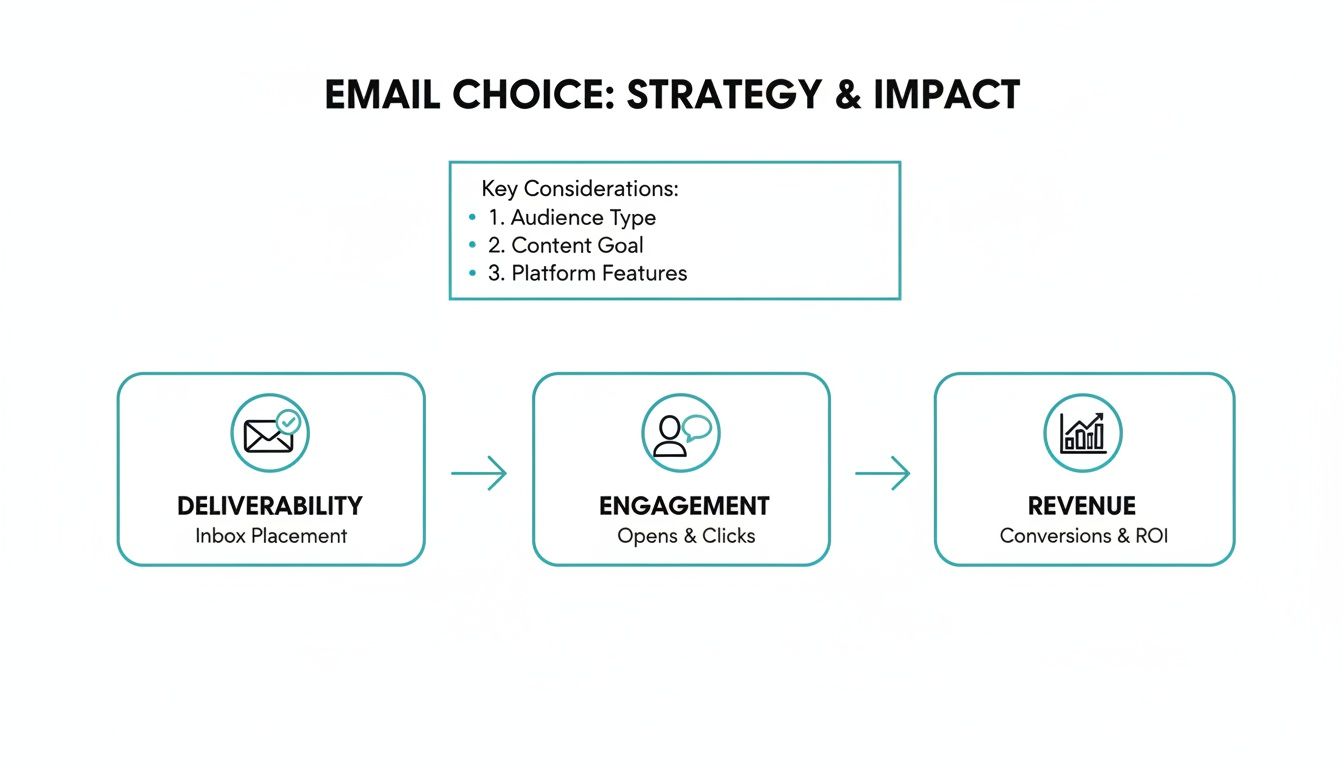
The takeaway for sales leaders is clear: to drive engagement and build a predictable pipeline, you must prioritize deliverability. For that, plain text is your most reliable tool.
HTML vs Plain Text: A Technical and Strategic Comparison
To make the right call, you have to look beyond aesthetics. The decision gets into the core mechanics of how your emails are processed by machines and perceived by people.
Here’s a direct, side-by-side look at how the two formats perform across the criteria that matter most in B2B sales.
This comparison drives home a critical point for any revenue team: for cold outreach, the authenticity and superior deliverability of plain text almost always trump the branding and tracking benefits of HTML.
Data-Backed Performance Differences
This performance gap isn't just theory; the data is conclusive. A comprehensive A/B test by HubSpot comparing plain text and HTML emails uncovered some stark realities. They found that HTML consistently tanked engagement.
Here are the key findings:
- Adding just one GIF to an email dropped open rates by 37%.
- A simple static image decreased opens by 25%.
- HTML emails had a 21% lower click-through rate, leading to 51% fewer total clicks.
The data confirms that richer formatting often leads directly to poorer results.
For an SDR, the math is simple: a 25% drop in open rate means a quarter of your addressable market never sees your message. This is why mastering email deliverability best practices is non-negotiable for building a predictable pipeline.
Ultimately, while HTML offers powerful tools for marketers engaging a warm audience, plain text is the superior format for sales professionals focused on one thing: starting valuable conversations with new prospects.
Comparing Prospect Engagement and Reply Rate Potential
Beyond just landing in the inbox, your email's format has a massive impact on how a prospect perceives your message—and whether they’ll bother to reply. The HTML vs. plain text debate isn't just a technical detail; it's a psychological one. For any B2B sales team, grasping this difference is how you turn an open into a real conversation.
A plain text email feels authentic. It lands in the inbox looking like a personal, one-to-one message typed out for a specific person. This is the bedrock of building trust in cold outreach, especially when trying to reach busy decision-makers who are experts at spotting and deleting anything that looks like a marketing blast.

On the flip side, a slick HTML email can immediately signal "generic marketing campaign." Even with strong personalization, the fancy design, branded headers, and custom fonts can make the entire message feel impersonal. Prospects might tune out before they even read your first sentence.
Aligning Your Format With Your Goal
Opens don't pay the bills; replies that lead to meetings do. The format you choose needs to be laser-focused on that single outcome.
Consider these real-world sales scenarios:
- SDR prospecting a C-level exec: Plain text is your only viable option. It’s direct, respects their time, and feels personal enough to get read. A flashy HTML email is almost guaranteed to be deleted on sight.
- AE sending a proposal follow-up: Here, a lightly formatted HTML email can work well. Including your company logo and making the proposal link a clear, clickable button looks professional without feeling like a mass email.
- Marketing sending the company newsletter: For broad communication to your existing list, a well-designed HTML email is essential. It’s about branding, visual engagement, and tracking clicks across content.
The pattern is clear: the colder the lead and the more senior the contact, the more you need to lean on plain text. It cuts through the noise and puts the focus squarely on the value in your message.
The bottom line is that real conversations begin with what feels like a real interaction. Plain text mirrors how people actually email each other, which gives you a huge advantage in a crowded inbox.
What the Data Says About Getting a Response
Countless A/B tests back this up, showing that plain text often drives more meaningful engagement. For instance, Litmus conducted eye-opening tests that split their audience between plain text and HTML emails, and the results were stark.
Even with their own customers, plain text was the clear winner, driving about 60% of conversions and pulling in higher open and click rates. When they tested it on non-customers, plain text still won on opens and was responsible for nearly half of all conversions.
This all comes back to a core tenet of effective outreach. While a flashy HTML email might get someone to click a "Learn More" button, a plain text email is built to get a direct, human response—which is where every sales cycle begins. For revenue teams, the reply is the only metric that truly matters. Getting more of them means mastering compelling copy, a cornerstone of our cold email best practices.
At the end of the day, open rates are a vanity metric if they don't translate to pipeline. Your choice between HTML and plain text should always be driven by one question: which format makes my prospect feel like this email was written for them and is worth a reply? For cold outbound, the answer is almost always plain text.
Choosing The Right Format for Your Sales and Marketing Goals
There’s no single right answer. The best email format depends entirely on your goal, your audience, and where they are in their journey. The "HTML vs. plain text" debate misses the point: the right choice is the one that achieves the specific outcome for that interaction.
For any modern revenue team, this means having a flexible playbook. You need to know when a simple, personal message builds trust and when a polished, structured email is needed to share information and look professional.
The SDR Playbook: Cold Outreach and Building Trust
For Sales and Business Development Reps (SDRs/BDRs), the mission is clear: start conversations and book qualified meetings. In this world, plain text is your default, non-negotiable choice for cold outbound prospecting.
Why? Because your primary goal is to get a reply from a busy executive who is trained to delete anything that looks like a marketing blast. A plain text email feels like a real, one-to-one message written just for them. It cuts through the noise and helps you earn the trust needed to get a response.
Here’s when plain text is mission-critical for the prospecting team:
- The First Touch: Your initial email in any sequence must prioritize deliverability and authenticity. Plain text gives you the best shot at landing in the primary inbox.
- Targeting the C-Suite: Senior leaders value brevity and a direct approach. A simple, text-based email is far more likely to get read and earn their respect.
- Multi-Touch Follow-ups: Sticking with plain text throughout a follow-up sequence reinforces the personal, persistent feel of your outreach.
The AE Playbook: Nurturing Opportunities and Closing Deals
Once an SDR qualifies a lead and hands it off to an Account Executive (AE), the objective shifts. The goal is no longer just getting a reply; it’s about nurturing the relationship, explaining complex details, and guiding the prospect toward a decision. This is where a lightly formatted HTML email can be incredibly effective.
This isn't a flashy marketing template. Think of it as a clean, professional email that uses subtle HTML to improve clarity. This could mean a company logo in the signature, bolded key terms, bullet points to outline next steps, or easy-to-click links to resources.
The right HTML for an AE is what we call "functional formatting." It’s not about design; it's about using basic formatting like links, lists, and bolding to make the message easier to digest and act on, without losing that personal touch.
AEs should use light HTML in these situations:
- Post-Demo Follow-ups: A bulleted summary of key takeaways with links to relevant case studies is much easier to scan than a wall of text.
- Sending Proposals or Quotes: A professional email with a clear call-to-action button or link makes it simple for the prospect to find and open critical documents.
- Scheduling and Confirmation: Using bold text for dates and times or including a clickable calendar link reduces friction for everyone involved.
The Marketing Playbook: Branding and Broad Communication
For marketing teams, the objective is usually much broader: building the brand, nurturing leads at scale, and distributing content to a large audience. In these cases, a well-designed HTML email is essential. People expect marketing communications to be branded and visually engaging.
HTML lets marketers create a consistent brand experience, track detailed engagement metrics, and use visual cues like buttons to guide subscribers toward an action. A plain text newsletter would feel out of place and fail to meet audience expectations. Executing effective email marketing for lead generation is key to getting this right.
Use well-designed HTML for:
- Newsletters and Content Distribution: Showcasing articles, videos, and other resources in a visually appealing layout.
- Webinar and Event Promotions: Using branded templates with clear registration buttons is proven to drive more sign-ups.
- Product Announcements: Highlighting new features with images, GIFs, and direct links is far more impactful than just describing them.
By matching the format to the role and the goal, your entire revenue team can communicate more effectively, giving every message the best chance to succeed.
How to Operationalize Your Email Strategy at Scale
Having a smart email strategy is one thing. Executing it consistently is where most teams fall apart. It sounds great to say, "SDRs will use plain text, AEs will use light HTML," but this plan often crumbles under the weight of fragmented tools, manual workflows, and zero visibility into what’s actually working.
The real challenge isn't just picking between HTML and plain text; it's making that choice stick without creating more work. When your SDRs use one platform, your AEs are in another, and RevOps is trying to fix broken syncs in the CRM, your strategy is doomed. Reps will always default to what’s easiest, not what’s most effective.
This is precisely why an all-in-one GTM platform is no longer a luxury. When your entire outbound process—from finding accounts to running multi-channel sequences and analyzing results—is in one place, you can finally run a sophisticated strategy that actually scales.

From Manual Workflows to an Automated GTM Engine
To make your email strategy work at scale, you have to move away from manual processes. The solution is automation that reinforces the right behaviors, automatically aligning the email format with the goal of each step in your sequence.
For instance, a modern prospecting platform like Willbe lets you build this logic directly into your workflows:
- Set Plain Text as Default: Ensure every initial cold email and early follow-up from an SDR automatically defaults to the high-deliverability plain text format. No second-guessing.
- Enable Light HTML for AEs: Let your Account Executives use pre-approved, lightly formatted templates for actions like demo recaps or sending proposals. It maintains professionalism without triggering spam filters.
- Automate A/B Testing: Continuously run tests comparing plain text and light HTML for different personas or industries. This replaces opinions with real data on what performs best.
This systematic approach guides reps toward the best choice for every touchpoint, turning a manual, error-prone process into a repeatable GTM engine.
The goal is to make the right decision the easiest decision. When your platform is built for modern sales workflows, strategic execution becomes the path of least resistance for your reps, not a hurdle they have to overcome.
The Power of Template-Free AI for Plain Text Outreach
One of the biggest struggles with scaling plain text outreach is keeping it from sounding robotic. Traditional templates and generic AI copy are spotted a mile away and deleted instantly. This is where a proprietary, template-free AI designed to sound like your user—not like a generic chatbot—gives you a serious edge.
Willbe’s AI is built specifically for B2B sales conversations. It analyzes prospect data to generate authentic, human-like copy that makes plain text emails incredibly effective, even at scale and across multiple languages. The AI doesn't just plug words into a template; it crafts a unique message for each person that sounds like it was written by hand.
This turns plain text from a simple format into a powerful tool for building genuine connections at scale. Your SDRs can send hundreds of personalized emails that feel like one-to-one conversations, driving reply rates up without spending hours on manual research.
Unifying Analytics for Clear Visibility
A fragmented tool stack leads to disconnected data. If you can't easily compare the performance of an SDR's plain text sequence against an AE's light HTML follow-up, you’re flying blind. You have no real insight into what actually generates pipeline.
An all-in-one platform brings your analytics into one place, giving sales leaders a clear, apples-to-apples view of performance. You can instantly see:
- Which format gets more replies from your key ICPs.
- How engagement changes between top-of-funnel outreach and mid-funnel follow-ups.
- The direct impact your email strategy has on booked meetings and revenue.
This clarity ends debates and enables decisions based on data, not hunches. By operationalizing your strategy in a single platform, you replace manual chaos with a predictable system that scales what works and helps your entire team close deals faster.
Frequently Asked Questions
Let's cut through the noise. Here are the straight answers to the questions revenue teams ask most often when weighing HTML against plain text for their outreach.
Can You Still Track Plain Text Emails?
Yes—you just track what actually matters. Plain text emails can't use the tracking pixels that power open rates in HTML, but you can and should track link clicks.
In B2B sales, a click is a far stronger signal of intent than an open. With privacy updates and email clients pre-loading images, open rates have become increasingly unreliable. Clicks and replies are where you find genuine interest and pipeline potential.
What Is Multipart MIME and Does It Matter for Sales?
Think of Multipart MIME as a smart, two-in-one email. It’s a technical standard that sends both an HTML version and a plain text version of your message together. The recipient's email client then automatically displays the version that works best for their settings.
For sales teams, this is a huge win. If you're using a lightly formatted HTML email for an AE follow-up, sending it as a multipart message is a crucial best practice. It’s your safety net—ensuring that even if a prospect has HTML blocked, they still get a clean, readable message. This is a simple way to boost deliverability and cover all your bases.
Are There Any Scenarios Where HTML Is Better for Cold Outreach?
For about 95% of cold prospecting, plain text is the superior choice. But there are rare, specific situations where a little HTML can make a big impact.
Imagine you're reaching out to a VP of Marketing or a Creative Director. If your email is about their visual branding, including a single, well-placed image or a clean, branded signature can add powerful context. It shows you've done your homework.
But tread carefully. This is a high-risk, high-reward play. You need an incredibly compelling and personalized reason to deviate from the plain text playbook. For nearly every other cold email, the authenticity and superior deliverability of plain text will generate better results.
Ready to stop debating email formats and start building a GTM engine that works? Willbe is the all-in-one prospecting and lead generation platform that replaces fragmented tools with a single, predictable system. Our verified B2B data and template-free AI help your team spark more conversations and close deals faster.
See Willbe in action and discover how top teams scale outbound without increasing headcount.