


If you're using LinkedIn's basic search bar for prospecting, you're trying to find a needle in a global haystack. It feels productive, but you’re often just wading through thousands of low-quality results. This wastes hours your reps could be spending on revenue-generating activities and burns through outreach credits on leads that go nowhere.
Mastering advanced search on LinkedIn is the first step toward building a scalable, data-driven engine for generating high-quality pipeline. It’s how you move from manual, inefficient list-building to a predictable GTM motion.
Why Basic LinkedIn Search Is Hurting Your Pipeline
Does your team's prospecting process start with plugging a generic job title into LinkedIn? If so, you're leaving revenue on the table. It's a classic scenario: an SDR needs to find decision-makers in a specific niche. A simple search for "Head of IT" returns a flood of profiles—consultants, junior staff, and people from completely unrelated industries.
What follows is a soul-crushing few hours spent manually sifting through profiles and cleaning a messy list, only to watch conversion rates drop. This isn't just an annoyance; it's a direct threat to the predictability of your pipeline. Every minute a rep spends vetting a bad lead is a minute they aren't engaging a high-intent prospect.

The Real Cost of Inefficient Prospecting
The problem with basic search goes deeper than irrelevant results. It's a complete lack of strategic depth. Top-performing sales teams don’t just find people; they pinpoint opportunities based on specific buying signals.
Here’s a snapshot of what you're missing when you stick to the basic search bar:
- Buying Intent Signals: You have no easy way to filter for new leaders who just started their roles, people at companies hitting a growth spurt, or professionals actively talking about the exact problems you solve.
- ICP Alignment: Basic search makes it nearly impossible to layer crucial criteria like company size, specific industry sub-sectors, and seniority levels with any real precision.
- Scalable Segmentation: Trying to build targeted campaigns for different personas or verticals becomes a manual nightmare. This undermines any attempt at personalization at scale, a cornerstone of effective account-based marketing. For a refresher, check out our guide on account-based marketing best practices.
The real problem is that a generic search treats every profile the same. An advanced approach, on the other hand, lets you operate with surgical precision, isolating the exact accounts and decision-makers who fit your ICP.
This guide is your playbook for moving past these limitations. We'll walk you through advanced search techniques to build hyper-targeted lists that fuel a modern, predictable sales engine. It’s time to turn LinkedIn from a simple directory into your most powerful source of high-quality pipeline.
Building Hyper-Targeted Lists With Boolean Logic
Let's be honest, a basic keyword search on LinkedIn is like casting a wide, leaky net. You might snag a few good prospects, but you'll waste most of your time sifting through irrelevant leads. To build a predictable pipeline, you have to stop thinking like a generalist and start operating like a data-driven sales professional. This is where Boolean logic comes in, transforming your advanced search on LinkedIn from a blunt instrument into a surgical tool.
Boolean search uses simple commands—AND, OR, and NOT—along with parentheses and quotation marks to build incredibly precise queries. Mastering this isn't about learning to code; it's about telling LinkedIn's algorithm exactly what you’re looking for. It's the core skill needed to cut through the noise and zero in on your ideal, ICP-aligned prospects.

The Core Operators Explained for Sales Teams
Forget the dry, technical definitions. For any SDR or AE on the front lines, these operators are practical tools for segmenting your market.
AND: This is your focusing lens. Use it to narrow your search by ensuring all your keywords appear in the results. It's perfect for layering criteria. For example, a search for
"Head of Sales" AND SaaSwill only show profiles that include both of those terms.OR: This operator broadens your reach. It’s for finding profiles that contain at least one of your specified terms. Think of it as your safety net for catching different job titles that describe the same decision-maker. A query like
"VP of Sales" OR "Sales Director"finds leaders who might use either title.NOT: This is your filter. Use it to exclude specific terms and clean up your results. If you sell to software companies but need to avoid a large competitor, you could search
SaaS NOT "Competitor Inc".
These operators are the foundation of any sophisticated prospecting motion. They're your first line of defense against wasting hours on unqualified leads.
Combining Operators with Parentheses and Quotes
This is where you start operating with real precision. Parentheses () group parts of your query, while quotation marks "" force LinkedIn to search for an exact phrase. When combined, you can build complex, multi-layered searches that solve real-world sales challenges.
Let's say your team is targeting senior sales leaders in the fintech space, but you need to exclude anyone working in consulting. A basic keyword search would be a mess. A Boolean search is clean and direct:
("VP of Sales" OR "Sales Director" OR "Head of Revenue") AND (Fintech OR "Financial Technology") NOT Consultant
This single query does the work of an hour of manual filtering. It bundles multiple job titles, accounts for industry variations, and actively removes a common source of noise. This is the kind of efficiency modern sales teams require to scale outbound.
By constructing queries like this, you ensure the list you build is already 80% qualified before you even click a single profile. This drastically cuts down the time from research to outreach, which is a key focus for any team serious about improving their prospecting on LinkedIn.
Ready-to-Use Queries for Common Prospecting Scenarios
To help you get started, here are a few copy-and-paste Boolean queries built for common sales plays. Tweak them to fit your specific ICP and target market.
This table provides powerful starting points.
These queries aren't just strings of text; they're strategic filters that align your search with specific business goals.
Using them consistently is what separates a reactive, low-yield prospecting process from a proactive, predictable pipeline engine. The lists you build with Boolean logic are cleaner, more accurate, and perfectly primed for the personalized outreach that drives replies.
Unlocking Precision With Sales Navigator Filters
If Boolean search tells you what to look for, then Sales Navigator’s filters pinpoint who and when. This is where you move from basic list-building to true opportunity identification. For any sales team serious about building a predictable pipeline, mastering these filters is the difference between shouting into the void and starting a meaningful conversation with a prospect who is ready to listen.
This isn't just about piling on more search criteria; it’s a strategic process of combining filters to uncover critical buying signals. The right filter combination can instantly surface newly hired leaders at companies that are actively expanding—a golden opportunity for any SDR or AE looking for a warm entry point.

Go Beyond Basic Demographics
Most sales reps stop at the basics: job title, industry, location. That's table stakes in today's advanced search on LinkedIn. The real power comes from layering on behavioral and situational filters that signal a recent change or a pressing need.
Consider this scenario. Searching for a "VP of Marketing" is a start. But what if you could find a "VP of Marketing" who started their job less than six months ago at a company that grew its marketing team by 20% in the last year? Now you're talking. You've just found a leader with a fresh budget, a mandate for change, and pressure to deliver early wins.
That’s exactly the kind of granular targeting that modern GTM platforms like Willbe are designed to act on, turning raw data into revenue opportunities.
Key Filters That Uncover Buying Signals
Let's break down some of the most powerful—and often overlooked—filters inside Sales Navigator and how to use them to find opportunities.
Spotlights for Recent Activity: This isn't just one filter; it's a dynamic group of tags. You absolutely want to be looking for prospects who have "Changed jobs in the past 90 days," are "Mentioned in the news," or are "Posting on LinkedIn." Each of these is a ready-made conversation starter that lets you skip the generic pitch.
Years in Current Role: Targeting leaders in their first year is a classic GTM play for a reason. New executives are significantly more likely to bring in new vendors as they look to make their mark. Combine this with company size or headcount growth to find new leaders with the budget to buy.
Company Headcount Growth: This is a direct indicator of momentum and investment. Targeting companies with 10-20% or higher growth in key departments (like Sales or Engineering) points you directly to organizations that are spending money and encountering scaling challenges your solution can solve.
Your goal isn't just to find people who fit your ICP on paper. It's to find people inside accounts that are showing clear signs of momentum. Growth creates problems, and problems create opportunities for sales teams.
LinkedIn's search has come a long way. Today, with over 40 distinct filters across platforms like Sales Navigator and Recruiter, you can slice and dice professional networks with surgical precision. It's a huge leap from the early days of basic keyword searches. Now you can layer in seniority, specific job functions, and even complex Boolean strings to pinpoint your ideal prospects. If you want a deeper dive on how these tools have evolved, you can learn more about mastering LinkedIn's advanced search tools.
Uncovering Niche Opportunities With Underused Filters
Beyond the well-known filters, a few hidden gems can help you build incredibly specific and valuable prospect lists that your competitors are probably ignoring.
1. Posted Content Keywords
This filter is a game-changer for writing relevant outreach. Instead of guessing who cares about your solution, you can find people who are already talking about the problems you solve. An SDR at a cybersecurity firm could search for content keywords like "data breach," "phishing prevention," or "compliance audit" to find CISOs and IT Directors with these issues top-of-mind, providing the perfect context-rich opener.
2. Groups
Targeting members of niche industry groups is a powerful tactic. These individuals have self-selected into a community, signaling strong interest in a specific topic. If you’re selling to RevOps leaders, targeting members of groups like "RevOps Co-op" or "Modern Sales Pros" gives you a highly concentrated audience of your ideal buyers.
3. Years of Experience
This is more nuanced than "Seniority Level." It lets you target people based on their total time in the workforce, not just their current title. This is great for finding seasoned professionals who hold influential, non-executive roles, or for identifying rising stars with a certain level of industry exposure.
By strategically combining these filters, you turn Sales Navigator from a contact database into a true prospecting intelligence engine. The lists you build are no longer just names; they are curated groups of high-intent prospects, ready for a personalized outreach sequence that gets a response.
Go Undercover: Finding Hidden Prospects With Google X-Ray Searches
Sometimes, the best prospects are hiding in plain sight. You can run a dozen searches on Sales Navigator and still miss people. Network limitations, privacy settings, or even LinkedIn's own algorithm can keep ideal profiles just out of reach.
When you've hit a wall and need to go deeper—especially for serious account research or mapping out a competitor's team—it's time to step outside of LinkedIn and use Google to your advantage.
This technique, often called an X-Ray search, uses Google’s massive indexing power to scan across all public LinkedIn profiles, letting you bypass some of LinkedIn's native search constraints. For any SDR or AE looking for an edge, it's a game-changer.
How X-Raying LinkedIn Actually Works
The mechanism behind this is a simple Google search operator: site:. This command tells Google to only show results from one specific website. When you pair it with the URL structure for LinkedIn profiles, you create an incredibly powerful prospecting tool.
Here's the basic formula:site:linkedin.com/in/ "Keyword 1" "Keyword 2"
This command tells Google to search only within the /in/ section of LinkedIn, where every individual profile lives. It's a clean, direct way to find public profiles that match your criteria, often turning up people far outside your immediate network.
Building Your First X-Ray Query
Let’s make this practical. Imagine you sell supply chain software and need to find a Director of Operations with experience using a niche system called "LogiFlow." A standard LinkedIn search might come up short if you don't have the right connections.
With an X-Ray search, you can get hyper-specific:
site:linkedin.com/in/ "Director of Operations" AND "LogiFlow"
This query instantly scans millions of public profiles for that exact combination of title and expertise. The best part? You can layer in the same Boolean logic you already know to get even more granular.
- Want to target a specific city?
site:linkedin.com/in/ "VP of Marketing" AND SaaS AND "Austin" - Need to find someone with a specific certification?
site:linkedin.com/in/ "Project Manager" AND PMP AND Manufacturing - Trying to find reps who used to work at a competitor?
site:linkedin.com/in/ "Account Executive" AND "worked at Competitor Inc"
Think of this as your secret weapon for account mapping. It helps you build a complete picture of who works where and what they know, uncovering key influencers that a standard search might miss entirely.
Turning Google Results into Actionable Leads
Now for the operational challenge. An X-Ray search returns a list of Google results, not a neat, exportable list of leads. Manually copying and pasting each profile URL into a spreadsheet is a brutal time-suck no high-performing sales team can afford.
This is where a modern sales workflow comes in. Top teams use X-Ray searches to quickly identify high-value targets. Then, they use an all-in-one platform like Willbe to ingest those profiles, enrich them with verified contact data, and drop them straight into a personalized outreach sequence.
It's all about bridging the gap between discovery and revenue. By combining the wide net of a Google X-Ray search with the precision of an integrated prospecting tool, you build a repeatable system for finding and engaging the exact people who need your solution—even when they’re hard to find.
Turning Your Search Results Into Revenue
So you’ve mastered Boolean logic, you’re flying through Sales Navigator filters, and you've even run a few clever Google X-Ray searches. You’ve got a perfectly curated list of prospects. Now what?
A list of names is just that—a list. It won't book meetings or close deals on its own. The real value is created when you turn those raw results into a system that consistently generates revenue.
I see sales teams make the same mistake over and over: they treat prospecting as a series of disconnected, manual chores. An SDR spends hours building the perfect list, only to copy and paste names into a spreadsheet, hunt down contact info, and then manually plug it all into a CRM to begin outreach. This entire process is a massive productivity killer and a surefire way to let high-intent leads go cold.
Stop Building Lists and Start Building a GTM Engine
Top-performing sales teams build a seamless system that connects finding prospects directly to converting them. Your advanced search results are the fuel for this engine, not the finish line. The goal is a fluid process where high-quality leads flow right from LinkedIn into an intelligent, scalable outreach machine.
This means getting out of spreadsheets and fragmented tool stacks. A modern workflow looks like this:
- Pinpoint Prospects: Use your advanced search skills to build that hyper-targeted list.
- Centralize and Enrich: Instead of a spreadsheet, pipe that list directly into an all-in-one platform like Willbe.
- Verify and Prep: The platform takes over, automatically finding verified contact data and preparing each lead for outreach.
- Personalize at Scale: Proprietary, template-free AI generates human-sounding messages tailored to each prospect.
- Launch and Convert: Kick off multi-channel sequences across email and LinkedIn to start conversations and book meetings.
When you integrate the process, you remove the manual friction that grinds sales cycles to a halt. Prospecting stops being a tedious, one-off task and becomes a repeatable, high-speed system that directly feeds your pipeline.
Put Your Prospecting on Autopilot with Saved Searches and Alerts
One of the most powerful, and often underused, features in Sales Navigator is the ability to save searches and create alerts. This is where you shift from a reactive "list-building" mindset to a proactive "opportunity-monitoring" one.
Think about it. Instead of running the same complex search every Monday morning, you can save a query built on your ideal customer profile—say, VPs of Engineering at Series B fintech companies in the Bay Area who recently changed jobs.
Setting up alerts for these saved searches turns LinkedIn into your personal trigger system. You get a notification the moment a new person fits your criteria, letting you be the first to reach out with a timely, relevant message.
This isn't just a time-saver; it's a must for any team serious about trigger-based selling. It’s a core component of effective B2B appointment setting and ensures you’re engaging prospects when they're most open to new solutions.
The Modern Prospecting Workflow in Action
By 2026, with AI enhancements and its 9+ core filters, LinkedIn's advanced search is less of a social feed and more of a predictable growth engine. The platform has 1.3B members, and it's where 46% of all B2B social traffic comes from, converting at a respectable 2.74%.
This is why we built Willbe to integrate directly with it. We pull this rich profile data into our own 30+ database aggregator for verified global contact info. From there, our proprietary AI crafts ultra-personal messages across multiple channels to scale what works and drive real pipeline growth.
The flowchart below shows how this works even with external tools like Google X-Ray search, moving from a simple search to using specific operators to pinpoint the exact profiles you need.
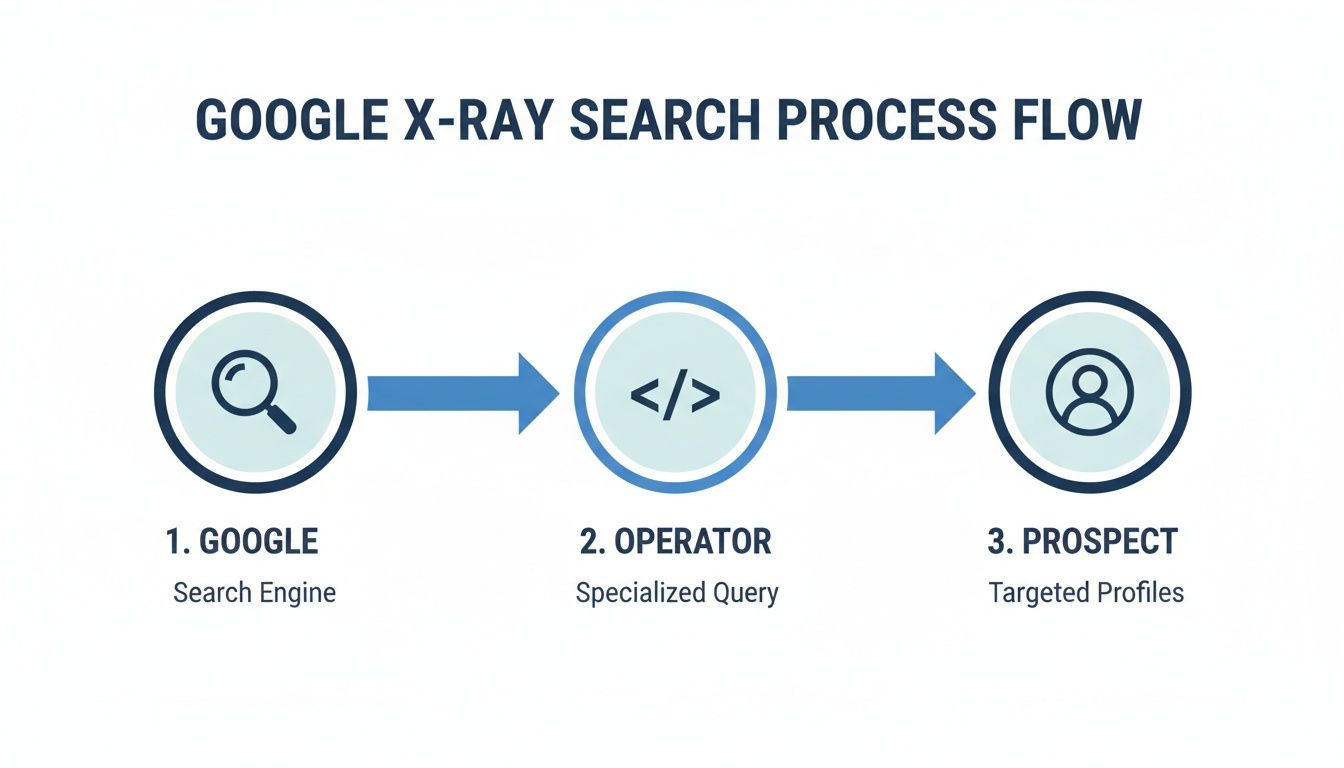
This process shows how you can find the right people and then feed them into a central platform for enrichment and outreach.
Ultimately, your success hinges on building a system, not just running searches. When your advanced LinkedIn search becomes the starting point for an automated, intelligent, and scalable outreach process, you finally stop just finding leads and start consistently generating revenue.
Common Questions About Advanced LinkedIn Search
Even after you get the hang of Boolean logic and Sales Navigator filters, a few practical questions always come up. Hitting a technical snag can kill your prospecting momentum, so let's clear up the most common sticking points right away.
My goal here is to provide quick, direct answers so you can get back to what matters: building high-quality lead lists that convert.
What's the Deal with Search Limits on a Free LinkedIn Account?
A free LinkedIn account has a "commercial use limit." It's an invisible monthly cap on searches designed to prevent heavy prospecting. LinkedIn doesn't publish the exact number, but you'll know when you hit it—your search capabilities get restricted until the first of the next month.
For any team serious about building a predictable pipeline, upgrading to a premium account like Sales Navigator is non-negotiable. It removes the commercial search limit and, more importantly, unlocks the advanced filters that are essential for serious prospecting: seniority level, company headcount growth, and recent job changes. These are the filters that help you find high-intent prospects.
A free account is fine for casual networking. But for serious B2B prospecting, it’s like trying to build a house with a toy hammer. The limits are there to guide you toward the tools actually built for generating revenue.
How Can I Save My Searches to Find New Leads Automatically?
This is one of the highest-leverage features in Sales Navigator. Once you’ve built a hyper-specific search query with your Boolean strings and filters, you can turn it into a continuous lead source. Just look for the "Save search" button at the top of your results page.
When you save it, give the search a descriptive name—like "VP Marketing - US SaaS - Series B"—and set up alerts to come in daily or weekly. This flips your process from manual list-building to an automated lead-gen machine. Instead of re-running the same search every Monday, LinkedIn will notify you when a new person matches your ideal customer profile, allowing you to be the first one to reach out.
Why Is My Boolean Search Giving Me Weird Results?
If your Boolean search is pulling in irrelevant profiles, it's almost always a simple syntax error. I've seen these three trip up even seasoned reps, so check them first.
- Operators must be in ALL CAPS. Your commands—AND, OR, NOT—have to be capitalized. If you type
and, LinkedIn just thinks you're looking for the word "and" in someone's profile. - Group your OR statements with parentheses. This is critical. When combining
ORwith other operators, wrap theORterms in parentheses(). For example:("Head of Marketing" OR CMO) AND SaaS. - Use quotes for exact phrases. If you're looking for a multi-word title, put it in quotation marks
"". Searching forHead of Saleswithout quotes will return anyone with "Head" or "Sales" anywhere in their profile, which is far too broad.
Getting your LinkedIn search right is a huge deal for B2B lead generation; 40% of marketers actually call it their number one source for high-quality leads. While a free search gives you a taste, a premium account like Sales Navigator opens up over 50 specific filters, letting teams build hyper-targeted, ICP-matched lists up to 10 times faster. To go even deeper on how this has changed the game, you can discover more insights on B2B lead generation.
The best search strategy is one that feeds directly into a smooth, scalable outreach system. Willbe plugs right into your prospecting workflow, taking those targeted lists and turning them into revenue. Our all-in-one platform enriches the data and kicks off AI-powered, human-sounding conversations that get replies and book meetings.